Make It Yours
Quick Canva Tutorials
US$0.00
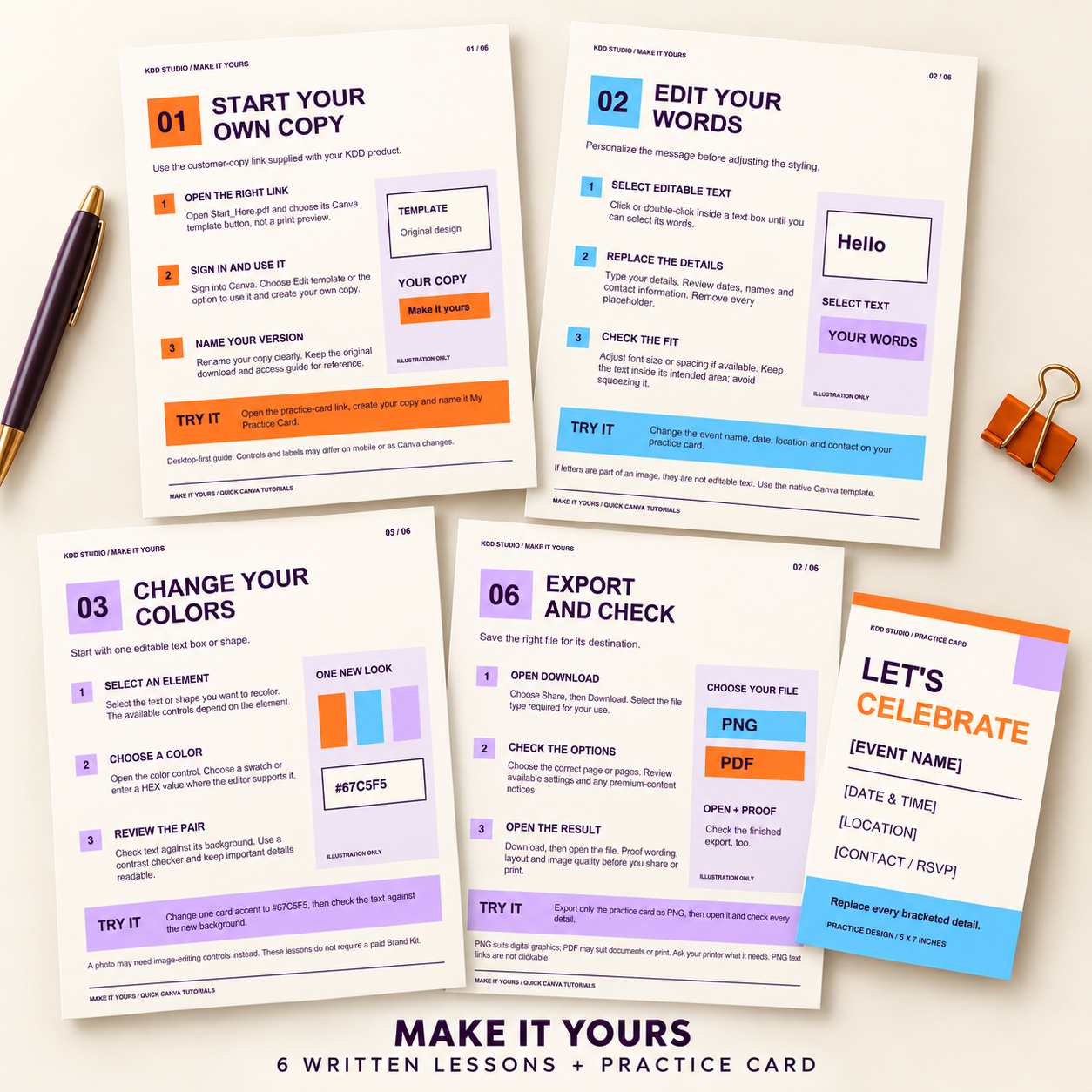
Make a template feel like yours. This free Make It Yours resource includes six written Canva mini lessons, an editable event practice card, matching printable references and a clickable Start Here guide. Learn how to personalize text, change colors, work with photos, tidy a layout and check your export.
Free resource. Add to cart and complete the $0 checkout to access your download.
Description
Small lessons for your next creative step
New to customizing Canva templates? Make It Yours breaks common editing tasks into six short written lessons. Follow three practical steps, then try the task in your own practice-card copy or a spare working page.
The pages use clear numbered instructions and simple illustrative diagrams. They are independent KDD Studio learning materials, not an official Canva course. This resource contains written tutorials, not videos or live coaching.
Your six mini lessons
- Start your own copy: use a customer-copy template link and name your working version.
- Edit your words: replace placeholders, adjust the fit and proof your details.
- Change your colors: recolor an editable element and review text against its background.
- Add your photo: understand uploads, native frames and careful cropping.
- Clean up the layout: move and align elements, compare spacing and recover an unwanted change.
- Export and check: choose a file type and pages, review the available settings and open your finished file.
What you receive
One editable Canva document with six US Letter lesson pages; one separate editable 5 x 7 inch event practice card; matching static PDF references for both documents; a three-page Start Here PDF with two clickable customer-copy template buttons and official help links; approved usage terms and a README, organized in one ZIP.
The practice card includes editable event name, date and time, location and contact placeholders, plus native text and color shapes. It has no photo frame. The photo lesson explains using native frames in other Canva designs or a spare working page.
Getting started
Unzip your download, open Start_Here.pdf and click each Canva button. Sign in and create your own copies before editing. Work through the lessons and practice at your own pace. Replace every bracketed detail on the card before exporting a finished version.
Internet access and a Canva account are required. Instructions are desktop-first; controls and features may differ on mobile, by account or as Canva changes. No paid Canva subscription is included. Review premium notices if you add new assets and use only content you have permission to use.
Printable reference files
The lessons are US Letter, 8.5 x 11 inches. The practice card is one single-sided 5 x 7 inch design. PDFs are static references, not fillable forms, and the card reference contains placeholders. Personalize your Canva copy before exporting a finished card. Print at actual size (100%), test a page and ask your printer about its requirements. No bleed is included in the reference PDFs.
Open and proof your downloaded file before sharing. A web address written inside a PNG is not clickable. Screen and printed colors can differ.
Usage
Use the lessons for personal learning or internal learning within one business. Customize the practice card for your own events or that business’s events and share the finished card with guests. Do not resell or redistribute the lessons, blank files, package or Canva template links. Layouts are non-exclusive. Full terms are included.
This is a digital resource. No physical goods, printing service, videos, live coaching or guaranteed results are included. Access help: hello@kavviesdigitaldesigns.com.
Reviews
There are no reviews yet.